Connecting a code host (GitHub, GitLab, Bitbucket)
Connect GitHub, GitLab or Bitbucket so Workover AI can read your code when it drafts documentation for a project. Connecting is done once per workspace; you then link the repositories each project should read.
Before you start: you need a Workover project to link the repository to, and on the code host you need permission to authorize apps for the account that owns the repository. For GitHub, that means permission to install the Workover GitHub App on the account (your personal account or the organization), unless it is already installed there.
Connect the code host to your workspace
- Open Workspace settings → Integrations.
- Under Code, click Connect on the card for your code host.
- For Bitbucket, Workover first shows Before you connect Bitbucket. Read it and continue (see How Workover reads your code).
- On the code host, authorize Workover. For GitHub, if the Workover app is not yet installed on the account that owns your repositories, GitHub asks you to install it and choose which repositories it can read. If it is already installed, you only authorize, and no second installation is created.
- You return to Integrations, where the card now lists the connected account.
To change which repositories the GitHub App can read later, change the app’s repository access in GitHub. You do not need to reconnect in Workover.
If a card shows Coming soon, that code host is not available in your workspace yet.
Link a repository to a project
- Open the project and click Project settings in the project toolbar.
- Find the Linked repositories card and choose the repository from the list.
- Repeat for any other repositories the project’s documentation depends on. A project can link several, including repositories on different code hosts.
To unlink a repository, click Disconnect on its row in Linked repositories. This removes the link for this project only.
Link a public GitHub repository you do not own
If the repository is public on GitHub but the Workover app is not installed on its owner’s account, type it as owner/name in the field under the list and click Link public repo. A repository linked this way is used for AI context only: documentation review and changelog drafting stay off for it.
Optional: review docs and draft changelogs from merges
For a linked GitHub repository whose owner has the Workover app installed, the Linked repositories card also offers:
- Review documentation on: the branch whose pushes are checked against your published docs.
- Draft changelog entries from: the branch whose merges become changelog drafts.
- Send changelog drafts to: the content type those drafts are filed under. Leave it unset and drafts are still created.
- Review pull requests too: check changes while a pull request is still open. Off by default.
These only run once the matching features are turned on for the workspace in Workspace settings → AI (Documentation reviewer and Changelog drafts from merges).
How Workover reads your code
- What it reads: the contents of the repositories you link, and, for documentation review and changelog drafting, commit and pull request information such as file names, commit messages, pull request titles and diffs.
- What it writes: nothing, with one exception. Publishing a Mintlify project commits to your docs repository or opens a pull request there.
- What it does not touch: issues, issue comments and CI logs.
- Where the reading happens: on GitHub and GitLab with an Anthropic key, your AI provider reads the repository on the host and Workover never sees your source code. With other AI providers, and always on Bitbucket, Workover reads the files a draft needs and passes them to your AI provider. Your source passes through Workover in transit; it is not stored, and only repositories you link to a project are read.
Naming a repository in a brief does not give Workover access to it. Drafts read the project’s linked repositories.
Disconnect a code host
Warning: Disconnecting removes the connection for the whole workspace, and it cannot be undone. Projects that rely on it stop syncing until you reconnect. For GitHub, that includes Mintlify publishing.
- Open Workspace settings → Integrations.
- On the code host’s card, click Disconnect, then confirm Disconnect in Disconnect integration?.
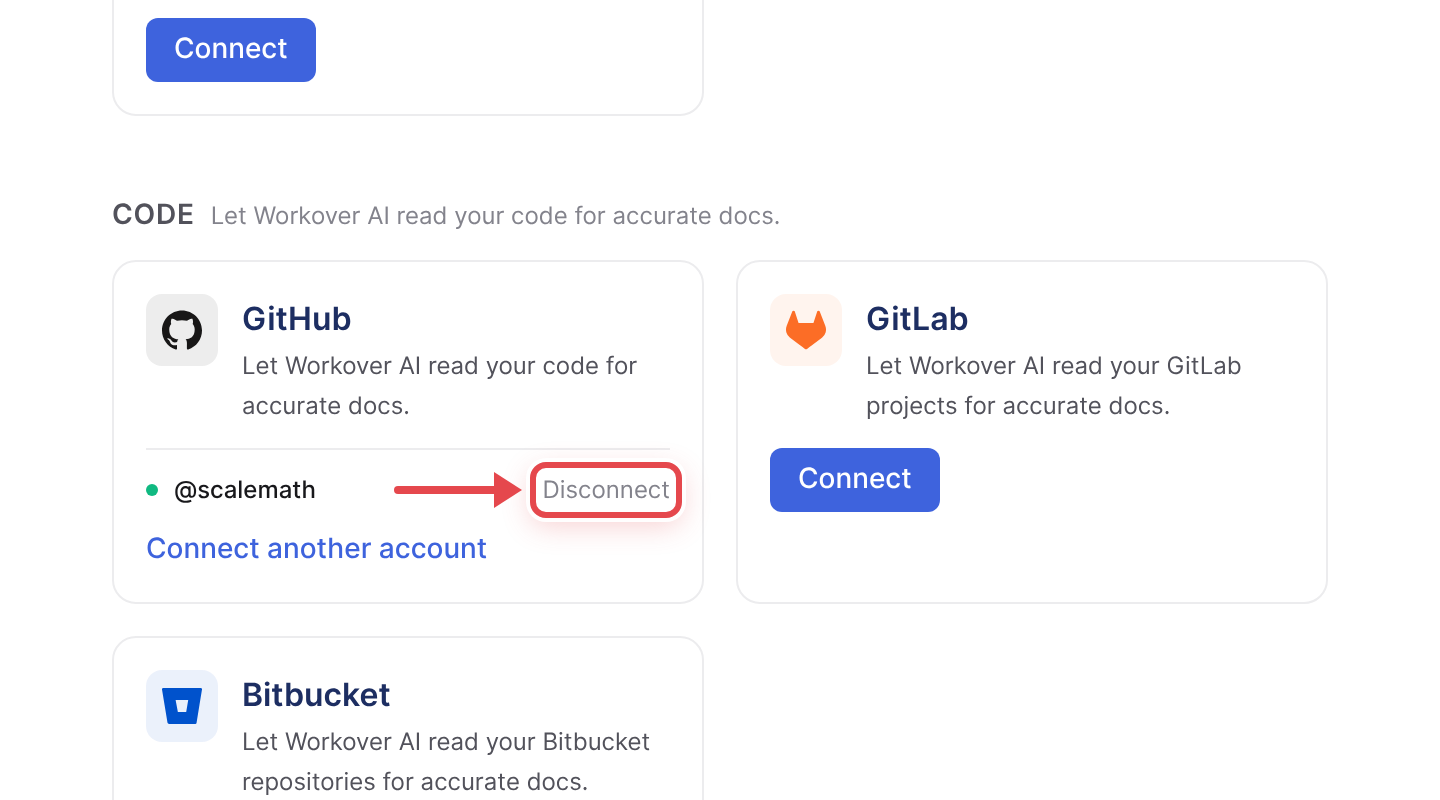
Documents already drafted are not affected.
Troubleshooting
“Documentation review and changelog drafting aren’t available” for a GitHub repository. Nobody has installed the Workover GitHub app on the account that owns that repository, so Workover never hears about its merges. Install the app on that account to turn these on. On GitLab and Bitbucket these features are not offered at all.
The repository is not in the list. For GitHub, check that the Workover app’s repository access on that account includes it. For a public repository you cannot install the app on, use Link public repo.
Related
Still need help?
Can’t find what you’re looking for? Our team is here to help.