Workover Monitor
Protect AI & Search Visibility with Real-Time Auditing
Continuous monitoring for every page you publish. Workover runs each one in a real browser around the clock, catches what breaks for visitors as well as what changed in the HTML, and only wakes you when it matters.
Last week, someoneedited robots.txt.
And every page still returned 200. The first sign is a traffic graph two weeks later, or a customer. Monitor finds out the day it happens, and tells whoever owns the page.
Monitoring built for the pages that earn
Catch it while it is still small
Every page is re-checked on a cadence set by how much it matters, so a broken canonical is caught in hours rather than at the next quarterly audit.
The right person, once
Related problems are bundled into a single incident and routed by email and Slack, at a sensitivity scaled to the page. One issue on ten thousand pages is one alert.
Fix what actually costs you
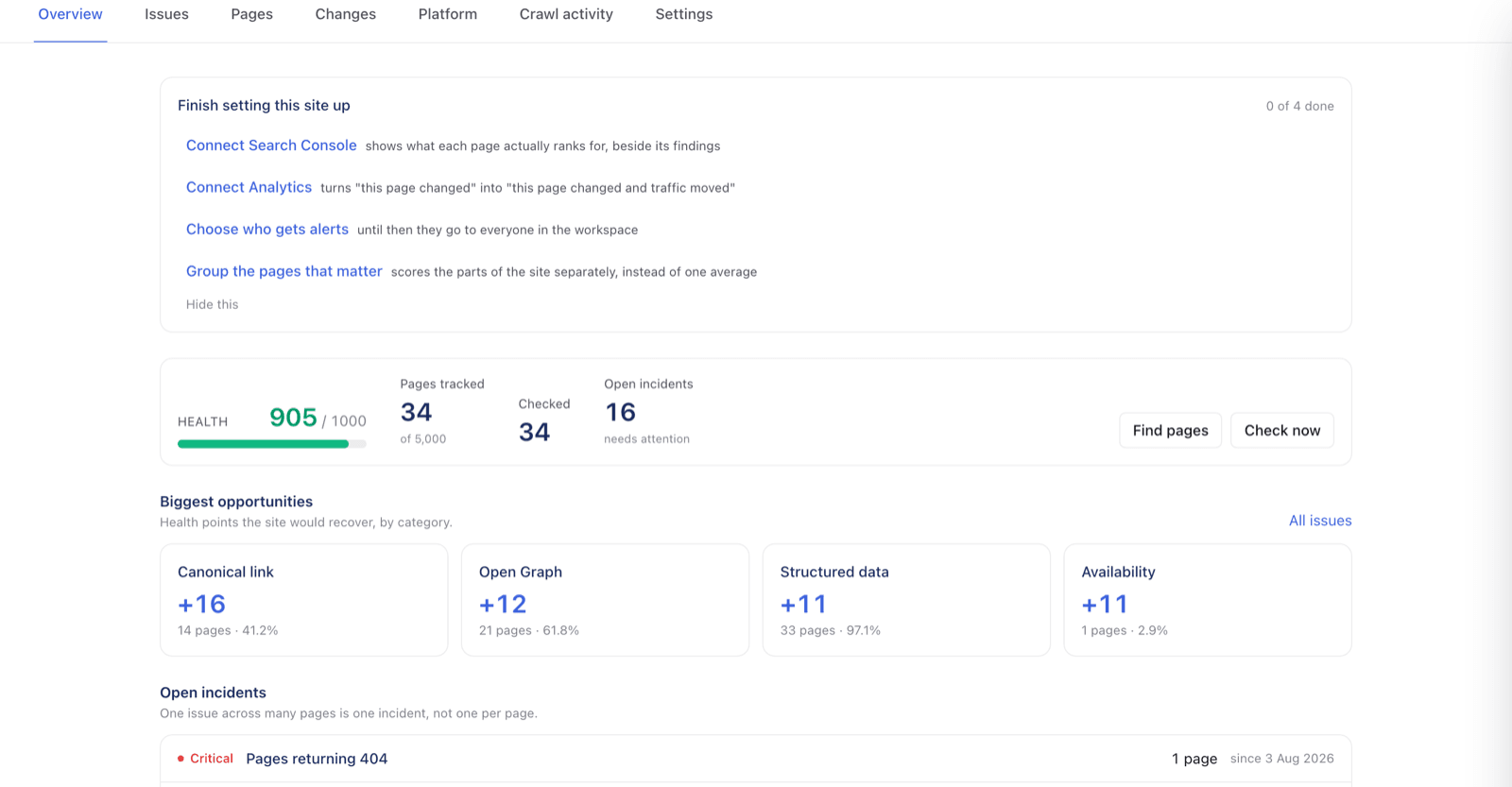
Every page carries a health score out of 1,000 and an importance score out of 10, the latter built from real Search Console clicks, so the list is ordered by consequence rather than by count.
A record of every change
Each check is diffed against the last and kept, so when traffic moves you can see what changed on that page and when, instead of arguing about it.
Console errors
The page returns 200 and the form still does not work.
Every check that only reads HTML agrees this page is healthy, because by every measure in the HTML it is. The breakage is in what happened when the page ran: a request the browser refused, a script that threw, a file that never arrived. Monitor renders each page in a real browser and listens to the console while it loads, so the errors your visitors hit are findings you get told about rather than something you discover from a support ticket.
Blocked by your own policy
A Content-Security-Policy that does not list a host the page needs blocks it silently. The classic version: the policy omits the endpoint an embedded form posts to, so the form renders perfectly and submits into nothing. Monitor reports the refusal and names the host, which is the fix.
Scripts that stop halfway
An uncaught error halts the script that raised it, so whatever it had left to do never happens: a widget never initialises, a menu never binds, a tracker never fires. The page looks fine and does not respond.
Resources that never arrive
A stylesheet, script or API call that fails leaves whatever depended on it dead. Usually a file renamed by a deploy, or a vendor domain that moved.
Noise, handled like everything else
Real pages carry constant third-party console chatter, so raw console output is useless as an alert. Errors are fingerprinted, so the same one is one finding however often it fires; new ones surface and known ones stay dismissed until something genuinely changes.
What Monitor watches
Continuous checks, not scheduled crawls
Pages are re-checked on a cadence set by how important they are, with politeness limits and back-off per host. Your highest-value pages are looked at most often.
Change tracking that ignores the noise
Every check is diffed against the last one and scored by severity, so you see a changed title or a dropped canonical rather than the cache-buster that changes on every request.
Issues, with a lifecycle
Checks for titles, headings, meta descriptions, canonicals, indexability, thin content and internal links. Each moves through a six-state model rather than reappearing in a fresh report every week.
Whole-property checks
robots.txt, sitemaps and TLS are watched as properties of the site, not of any one page, so a bad deploy that de-indexes everything is one alert rather than ten thousand.
Segments over any page property
Slice the site by path, template, status, score or any extracted attribute, and track that slice over time. Blog health and checkout health stop being one averaged number.
Console errors, caught in the browser
Every rendered page is watched while it loads: blocked requests, uncaught exceptions, failed resources and errors scripts log for themselves. This is the breakage no HTML check can see, and the reason a page can return 200 with a form that does not submit.
JavaScript rendering
Pages are rendered in a real headless browser and the rendered DOM compared against the raw source, so you can see exactly what a crawler gets versus what a visitor does.
Custom element extraction
Pull any selector out of the page (schema blocks, price, author, an A/B flag) and watch it like a first-class attribute, with its own diffs and alerts.
Log-file analysis
Ingest server logs and attribute hits to verified crawlers rather than to anything claiming a Googlebot user agent, so crawl budget answers are based on the real thing.
IndexNow submission
Switch it on and changed URLs are submitted to participating search engines within half an hour of the change being detected, instead of waiting to be re-crawled.
Core Web Vitals
Field data from the Chrome UX Report, tracked per page beside everything else, so a layout shift regression shows up next to the change that introduced it.
Search Console and analytics, joined
Clicks, impressions and sessions land next to the technical state of the same page, so a ranking drop and the change that caused it are on one screen.
Uptime, every minute
One request a minute to your origin, with every failure confirmed by a second before anyone is woken. The all-clear tells you how long it lasted, which is the part you have to forward to someone.
Certificate expiry
The rarest thing in monitoring: an outage with a known date. You hear about it while there is still time to renew, not when visitors start seeing a browser warning.
robots.txt, watched line by line
Edited a few times a year, always deliberately, and occasionally the two-character change that removes a site from search. Changes arrive as a diff of the directives, ignoring comment churn.
Domain variants
If your www or http address stops redirecting and starts serving the site, the property quietly exists twice and splits its own ranking signals. Nothing on any page looks wrong.
Analytics that disappeared
A pruned tag container or a consent rewrite can drop your tracking snippet with every check still passing. You find out in days rather than at the end of a month whose data cannot be recovered.
How Monitor works
Five stages, running continuously, from a URL you gave it to an alert someone acts on.
- 01
Discover
Point Monitor at a site. It reads your sitemaps and follows links to build the page list, respecting robots.txt and rate-limiting itself per host.
- 02
Check
Each page is fetched on its own cadence and reduced to a set of observed attributes: status, title, headings, canonical, indexability, word count, links, and anything else you have asked it to extract. It is also run in a real browser, and everything it reports to the console is captured.
- 03
Diff
That observation is compared with the previous one. Differences become changes with a severity; failed checks become issues that open, persist and resolve.
- 04
Bundle
Related issues are reconciled into a single incident. One problem affecting ten thousand pages is one incident with ten thousand pages attached.
- 05
Alert
Incidents are matched against your alert rules and delivered by email and Slack. Once, to the people who care about that part of the site.
Built so you keep the alerts on
Most site monitoring dies the same way: it reports everything, so it gets muted, and then it may as well not exist. These are the decisions that stop that happening.
One incident, not ten thousand emails
Incidents are the bundling mechanism, by design. A template change that breaks the canonical on every product page produces a single alert naming the pattern. Reporting it ten thousand times is the failure mode that gets most monitoring tools muted within a week.
It runs the page, it does not just read it
A tool that fetches and parses can only ever tell you about the HTML, and a modern page breaks in the browser: a refused request, a script that threw, a dependency that never loaded. Monitor renders each page and listens to the console, so "the markup is perfect and the feature is broken" is a state it can actually report.
It hashes what you watch, not the HTML
Hashing raw HTML reports a change on every request for any page carrying a CSRF token or a cache-buster, which is most of the web. Monitor hashes only the projection of the page you asked it to watch, so a reported change is a real one.
An unreachable page is one problem
When a page times out, content checks are skipped rather than run against nothing. You get "this page is down", not twenty findings claiming every element vanished at once.
Importance decides the noise floor
Alert sensitivity scales with a page importance score built from real clicks and sessions. The pages that earn the traffic get the tightest thresholds; a stale tag archive does not page anyone.
How it compares
Most SEO tools audit on a schedule. This one watches.
The category splits cleanly in two. Crawl-based auditors re-crawl your site daily or weekly and hand you a report, which means a change made on Tuesday morning is news on Wednesday. Continuous monitors watch for change and tell you as it happens. Monitor is the second kind, and it adds the two things the second kind has historically not done: it runs the page in a real browser, and it knows what the page earns.
How often it looks
Typical elsewhere
Scheduled audit tools re-crawl on a daily or weekly cycle. Semrush Site Audit offers daily or weekly; finer than that needs a Zapier workaround.
Workover Monitor
Continuously, per page, on an interval that follows how often the page actually changes. The origin itself is probed every minute.
What counts as broken
Typical elsewhere
What the HTML says. A page that returns 200 with valid markup passes, whatever happened when it ran.
Workover Monitor
What the browser saw. Each page renders and we listen to the console, so a refused request, a script that threw or a dependency that never loaded is a finding rather than a support ticket.
Whether the site is up
Typical elsewhere
Usually a separate product. SEO monitoring and uptime monitoring are bought from different vendors and alert into different channels.
Workover Monitor
One product, one alert stream. The origin is probed every minute, every failure is confirmed by a second request before anybody is woken, and the all-clear says how long it lasted.
The whole property, not just its pages
Typical elsewhere
Conductor alerts on robots.txt, SSL expiry and domain variants that stop redirecting, which is the strongest platform coverage in the category.
Workover Monitor
The same set, plus the outage and the robots.txt diff, each as an incident that says what it costs and what to do rather than a flag on a dashboard.
Whether it knows what the page earns
Typical elsewhere
Findings are ranked by severity, or by a health score computed from the page alone.
Workover Monitor
Search Console and analytics are joined to the crawl, so a 404 on a page with traffic is a different, louder finding from a 404 on a page nobody visits. Alert thresholds scale with that.
Whether it knows you published it
Typical elsewhere
No crawler owns the document that produced the page, so "published three weeks ago and still invisible to search" is not a question any of them can ask.
Workover Monitor
Workover published it, so it can. That finding exists here and cannot exist in a tool that only sees the URL.
What arrives in your inbox
Typical elsewhere
One alert per finding is common, which is what teaches people to filter the channel.
Workover Monitor
At most one message per person per pass, across every site they watch, criticals first and named in the subject line.
Comparisons describe published capabilities of scheduled-crawl audit tools and continuous monitors as documented by their vendors, checked September 2026. Semrush Site Audit re-runs on a daily or weekly schedule; Conductor Website Monitoring (formerly ContentKing) publishes its full alert-trigger list. Capabilities change, so check current documentation before making a decision on ours.
Before you point it at production
Something we did not cover? Ask us.
Page checks on your site start at least half a second apart, longer if your robots.txt sets a Crawl-delay, and robots.txt is obeyed on every one. If your server answers with a 429 or a 503, Monitor stops checking the whole site and waits, for as long as Retry-After asks or five minutes if it does not say.
The address of the site. There is no snippet to install and nothing to verify. Connecting Search Console or Google Analytics is optional; it makes the importance score reflect real traffic, and everything else works without it.
No. Monitor watches any public website, whatever built it. If you also publish with Workover, the two are linked, which is what lets Monitor notice a page you published that search has still not picked up.
Not today. Monitor sees what a signed-out visitor and a search crawler see, and it does not sign in or solve challenges. If your firewall challenges unknown bots, allowlist the WorkoverMonitor user agent so it gets the real page.
Your most important pages every 15 minutes, your least important once a day, and everything between on a curve set by traffic, links and depth. Separately, the site itself is checked every minute for uptime, and robots.txt, sitemaps and the certificate every hour.
By email, and to Slack as a direct message on any alert rule you turn it on for. Related findings are bundled, so each check-in sends a person at most one email per workspace, with the most serious problem named in the subject line.
Something on your site changed this week, and nobody has checked what it broke.
Tell us the site. That is all Monitor needs to start.
- No snippet to install
- Search Console optional