Notifications
Workover notifies you about comments, mentions, projects you are added to and publishing to your site. Every notification lands in your inbox. Email follows the preferences you set.
What you are notified about
Only project members receive the comment and publishing notifications below. Someone whose only access is a shared document or a link does not get them.
| Event | Who receives it | Preference | |
|---|---|---|---|
| Someone @mentions you in a comment | The person mentioned | Right away | Mentions |
| A new comment or reply on a document | The document’s creator and everyone who has commented on that document before, except the author and anyone mentioned | With your delivery setting | Comments & replies |
| You are added to a project | The person added | Right away | Sharing |
| A document goes live on your WordPress site | Everyone on the project, including the person who published it | Right away | Published to your CMS |
| Someone pushes an update to WordPress | Everyone else on the project | With your delivery setting | WordPress sync |
| A linked post is edited directly in WordPress | Everyone on the project except the person whose visit detected the change | With your delivery setting | WordPress sync |
You are never notified about your own actions, except when a document you published goes live.
This table covers collaboration and publishing. Other features, such as documentation review, can also add notifications to your inbox.
What is not a notification
- Being shared into a document. Sharing a document with someone who already has an account does not notify them. Someone without an account gets the invitation email instead.
- Being invited to a workspace. The invitation arrives by email only and does not appear in your inbox.
- Every edit. Editing does not create notifications. To see what changed, use Version history.
- Monitor alerts. These have their own channel. See Alerts and incidents.
Where notifications appear
- The bell in the app header shows your unread count. Click it to open your notifications.
- The Inbox page lists every notification, with Inbox, Bookmarks, Snoozed and Archive tabs.
- Email, according to your preferences.
- Slack, as a direct message, if you turn on Slack in your preferences and your workspace is connected to Slack. See Slack.
The inbox covers every workspace you belong to, so you see a mention from another workspace without switching to it.
Read, filter and clear
- Click a notification to open what it is about. A comment notification opens the document at that comment.
- Click Filter to narrow the list by read status and by type (Everything, Document reviews, Comments and mentions, Sharing and publishing). From, Workspace and Project filters also appear when the list holds notifications from more than one person, workspace or project.
- Open the inbox’s actions menu and choose Mark all as read to clear your unread count.
Change what you are emailed
Your inbox always receives every notification. These settings control email and Slack.
- Open your account menu in the top right, choose Profile, and select the Security tab. You can also click Manage preferences in any notification email.
- Under Preferences, find Email notifications.
- Turn All emails off to stop all notification email, or turn individual categories on or off: Mentions, Comments & replies, Sharing, Published to your CMS and WordPress sync.
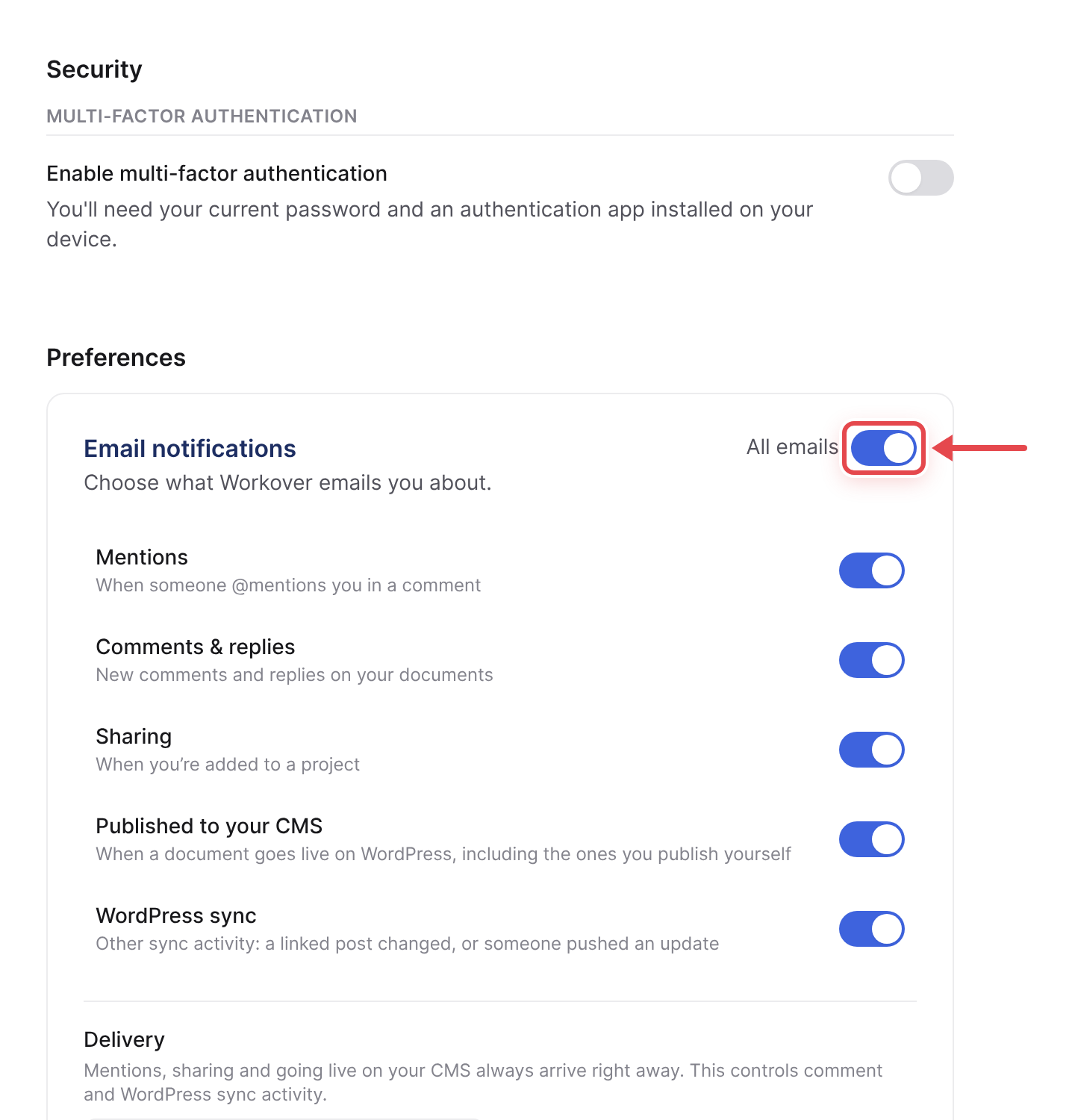
- Under Delivery, choose As it happens, Daily digest or Off. This applies to comment and WordPress sync email. Mentions, being added to a project and going live on your site always arrive right away. Daily digest is the default and sends one email a day.
Changes save as you make them.
Related
Still need help?
Can’t find what you’re looking for? Our team is here to help.