Members and seats
Workover Essentials is billed per seat, per workspace. This page lists exactly who occupies a paid seat, who does not, and when a change to the seat count is charged. Use it to answer “why am I paying for this person?”
To see your current seats, open the workspace switcher, choose Workspace settings, then the Plan & billing tab. The Billable members list shows each person who occupies a seat once, with a pill that says how: their workspace role, or Project access if they are only on a project.
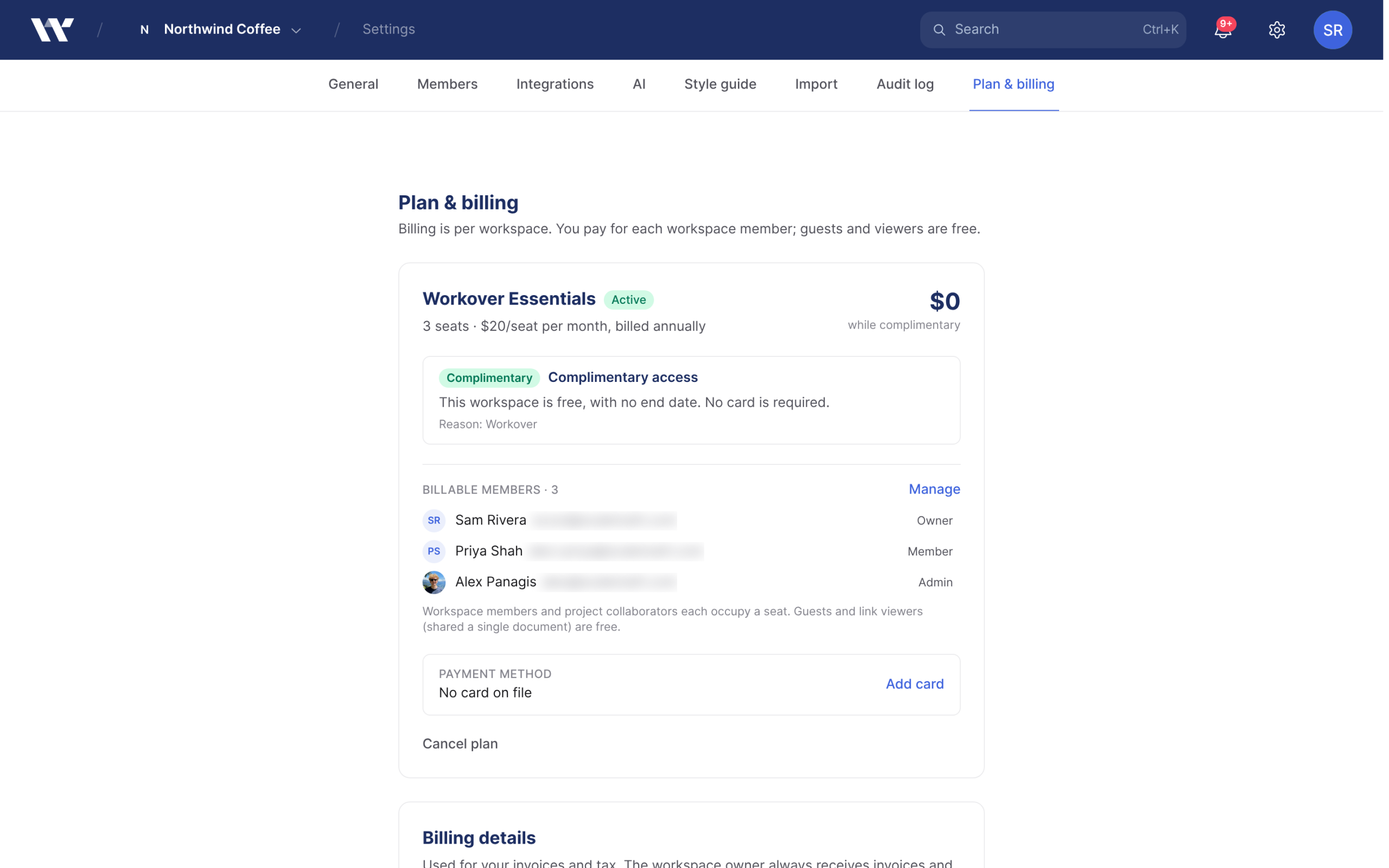
If you are unsure of the difference between a workspace and a project, read Core concepts first.
Who occupies a seat
A seat belongs to a distinct person. Someone who qualifies in more than one way is still billed once.
| Who | Occupies a seat |
|---|---|
| Workspace member with the Owner, Admin or Member role | Yes |
| Project collaborator: anyone added to any project in the workspace, whether or not they are a workspace member | Yes |
| Guest: someone given access to a single document by sharing it, without being added to its project | No |
| Link viewer: someone who opens a document through an “anyone with the link” link | No |
| Pending invitation that has not been accepted | No |
Things that surprise people:
- Project access alone costs a seat. Adding someone to a project occupies a seat whatever their role on that project. The boundary is project access, not workspace membership.
- You cannot make someone a Guest by hand. When you invite people to the workspace you choose Member or Admin. People become guests only by being shared a single document. If a guest is later added to that document’s project, or to the workspace, they occupy a seat from then on.
- Removing someone from the workspace does not remove them from its projects. If they are still on a project, they still occupy a seat. Remove them from each project too.
- The count never drops below 1, even in a workspace with nobody who qualifies.
When seat changes are charged
| Change | What happens to the bill |
|---|---|
| Seat count goes up | The added seats are invoiced and charged straight away, prorated for the rest of the billing period. During a free trial nothing is charged. |
| Seat count goes down | The removed seats are credited against your next invoice. There is no immediate refund. |
| Count is unchanged | Nothing happens and no proration is created. |
| No plan started yet | Nothing is charged. When you start a plan, it begins with the seat count at that moment. |
Because each increase is charged when it happens, adding people mid-cycle produces its own small invoice, separate from your renewal invoice.
How quickly the count updates
| What changed | When the seat count updates |
|---|---|
| Someone is added to or removed from a project | Immediately |
| Someone is removed from the workspace | Immediately |
| Someone accepts a workspace invitation, or a guest is given a workspace role | Within the hour |
Every workspace with a subscription, including one on a free trial or with a failed payment, is also re-checked once an hour. That hourly check catches anything an earlier update missed, and needs no action from you.
Related
Still need help?
Can’t find what you’re looking for? Our team is here to help.