How to turn on two-factor authentication
Two-factor authentication adds a code from an authenticator app to your password when you sign in. Your Workover account can publish to your live website, so it is worth protecting. In settings, Workover calls this multi-factor authentication; on the sign-in screen it is called Two-factor authentication. They are the same thing.
Before you start: you need your current Workover password and an authenticator app on your phone or computer, such as Google Authenticator or 1Password.
Turn on two-factor authentication
- Open your avatar menu and choose Profile to open Account settings, then open the Security tab.
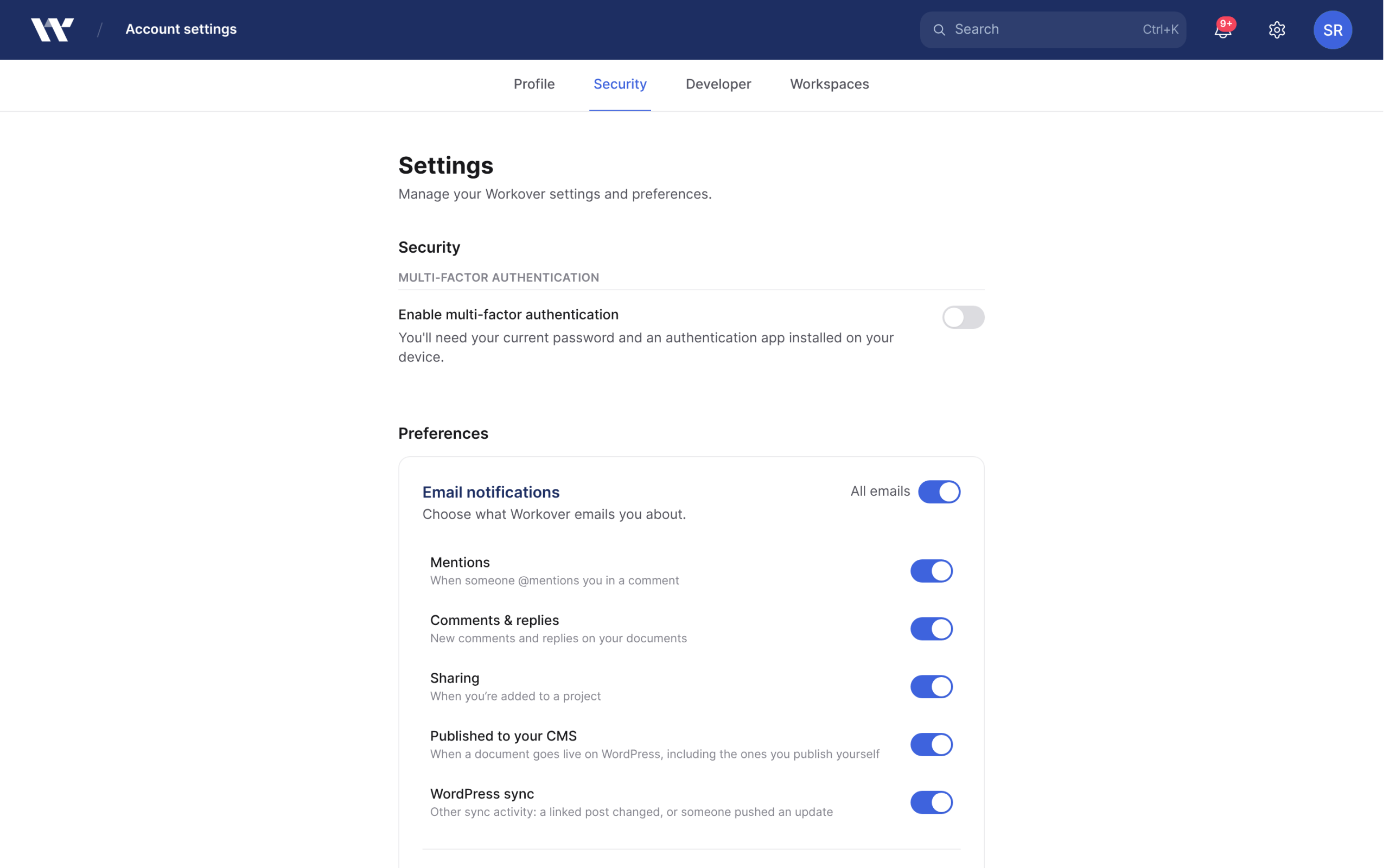
- Under Multi-factor Authentication, turn on the Enable multi-factor authentication toggle.
- Enter your Current Password and click Continue.
- On Connect Authenticator App, scan the QR code with your authenticator app.
- Enter the 6-digit Verification Code from the app and click Continue.
- On Save your Emergency Recovery Codes, click Download recovery codes. This saves a file called
workover-recovery-codes.txt. You must download it before you can finish. - Click Yes, I’ve saved my recovery codes.
Two-factor authentication is on as soon as you reach the recovery codes step. The row now reads Multi-factor authentication is on, and from your next sign-in Workover asks for a code after your password.
Sign in with two-factor authentication
After your password, the Two-factor authentication screen asks for the 6-digit code from your authenticator app. Enter it and click Verify.
If you cannot reach your authenticator app, click Use a recovery code instead and enter one of your recovery codes.
Keep your recovery codes safe
Recovery codes get you in when you lose your phone or authenticator app. Each code works once.
- Store the file somewhere other than the phone that has your authenticator app, such as a password manager.
- There is no button to generate new codes on their own. To get a fresh set, turn two-factor authentication off and on again; setting it up again issues new codes.
Turn off two-factor authentication
Warning: Turning it off means your password alone gets into your account, and your authenticator app and recovery codes stop working.
- In Account settings > Security, turn off the multi-factor authentication toggle.
- In Turn off multi-factor authentication, enter your Current Password.
- Click Turn off.
If you lose access
- You still have a recovery code: sign in with it, then turn two-factor authentication off and on again to connect your new device and get new recovery codes.
- You have no recovery code: contact support.
What it does not cover
Two-factor authentication protects your Workover sign-in. It does not protect your WordPress site, which has its own login and its own second-factor settings. It also does not affect the application password Workover uses to connect to WordPress, which you can revoke from wp-admin at any time.
To review the CLI and MCP connections signed in to your account, open Account settings > Developer and check Connected devices.
Related
Still need help?
Can’t find what you’re looking for? Our team is here to help.